Smart home communication protocols like WiFi, Zigbee, and Z-Wave determine whether your smart home feels smooth and reliable or slow and frustrating. Choosing the right one affects how devices connect, respond, and scale across your home, especially when you start adding more automation.
Many people install smart lights, thermostats, or security devices expecting everything to “just work.” But once the system grows, delays, disconnections, and random failures start to appear. The issue is often not the devices themselves—it is the communication protocol underneath them.
Understanding how WiFi, Zigbee, and Z-Wave actually behave in real home environments helps you avoid these problems before they start. Each protocol solves a different challenge, and the best smart home setups often rely on a mix of all three instead of only one.
Takeaways
- WiFi is fast but can become unstable in crowded home networks due to interference and device overload.
- Zigbee builds a mesh network where devices connect to each other, improving coverage as you add more devices.
- Z-Wave uses a lower-frequency signal that reduces interference and improves long-range reliability.
- Smart devices are often small and energy-constrained, so protocol efficiency matters as much as speed.
- Smart hubs can combine multiple protocols to create a more stable and scalable smart home system.
Why Smart Home Communication Protocols Matter
The biggest misunderstanding in smart home setups is assuming all devices communicate the same way. In reality, each device depends on a specific communication structure that affects speed, range, and reliability. When that structure doesn’t match your home environment, performance problems appear.
For example, a home filled with WiFi-only devices may seem convenient at first, but as more devices connect, the network can become crowded. This leads to delays when turning lights on, lag in sensors, or inconsistent automation triggers. The issue is not the smart devices—it is how they are communicating.
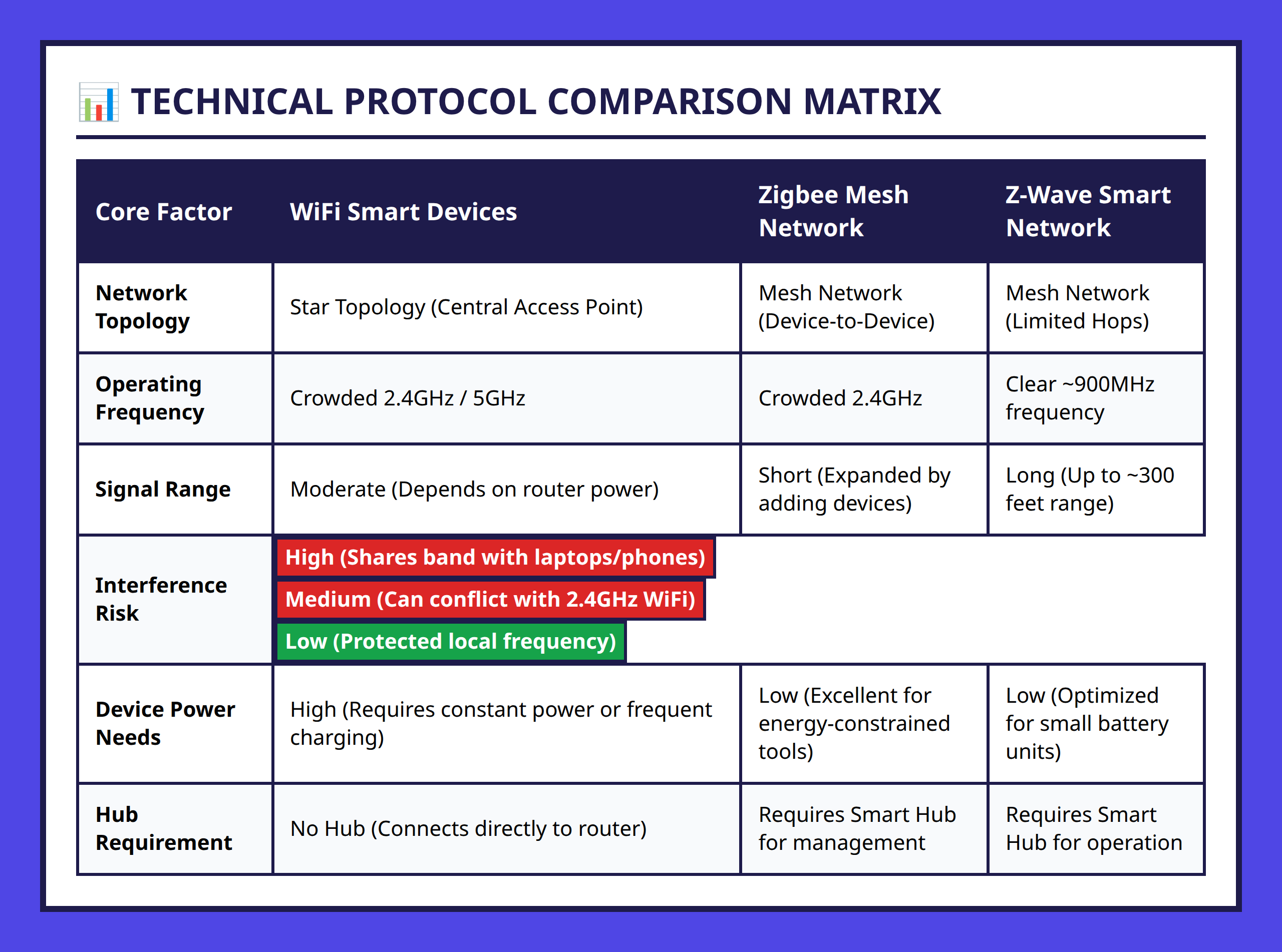
Smart home protocols solve this problem in different ways. WiFi focuses on high bandwidth, Zigbee focuses on scalable mesh networking, and Z-Wave focuses on stable long-range communication with less interference. Understanding this balance is the key to building a system that works consistently.
How WiFi Works in Smart Home Systems
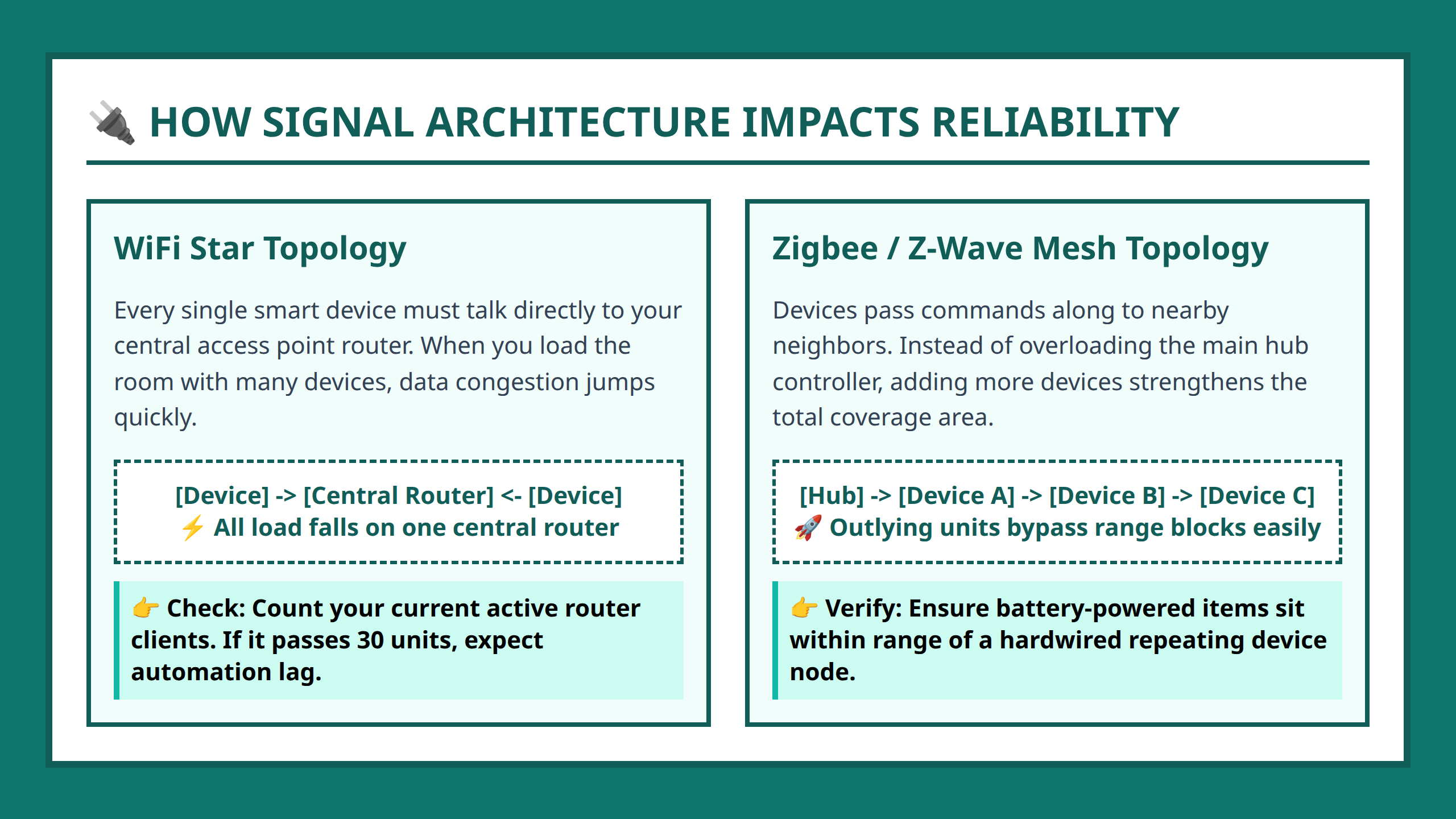
WiFi is the most familiar smart home communication method because it is already built into almost every home. It connects devices through a star topology, where every device communicates through a central access point like a router.
This structure is simple and powerful. A smart speaker, camera, and thermostat can all connect directly to the router without needing extra hardware. It also supports high bandwidth, which is why WiFi is commonly used for video streaming devices like security cameras.
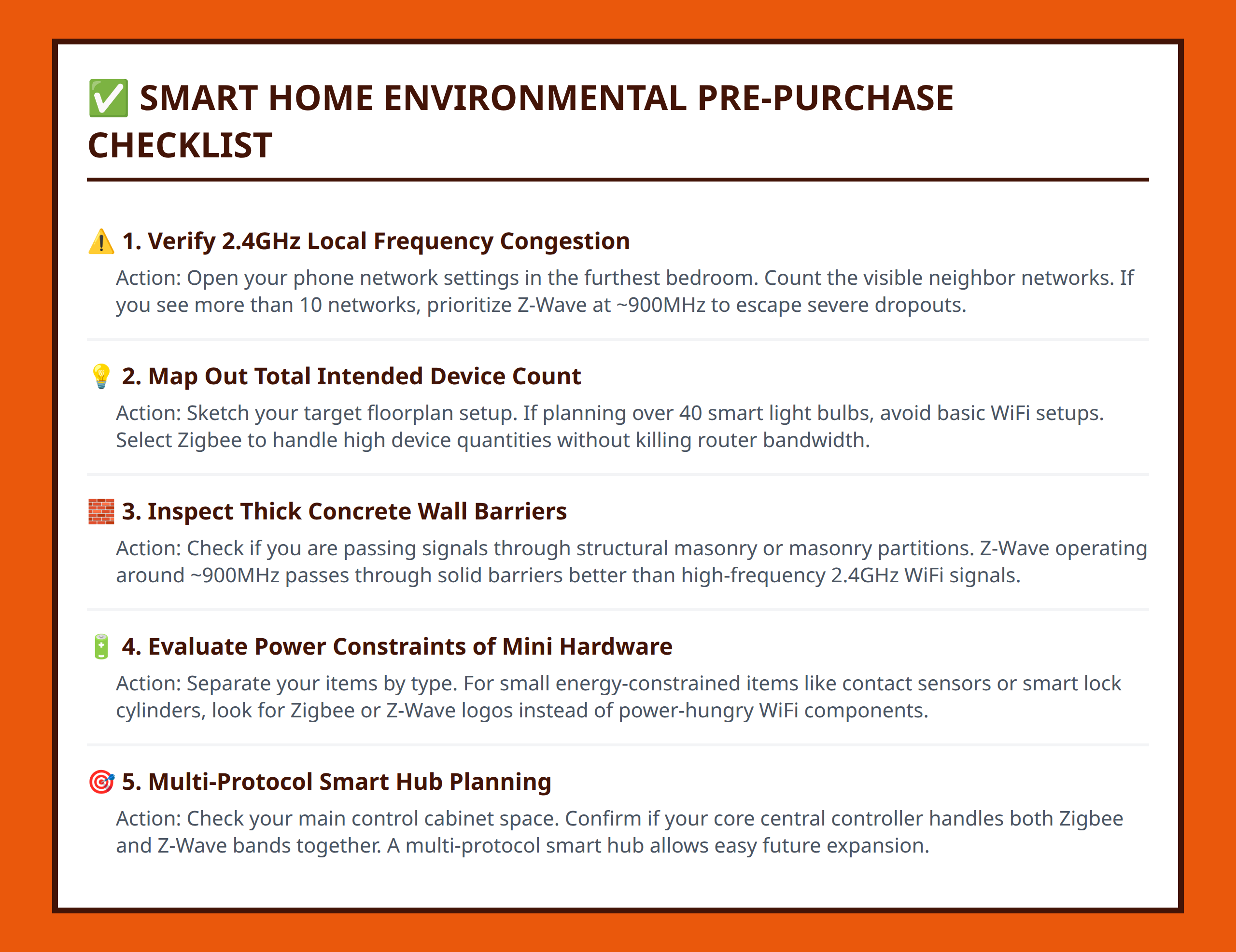
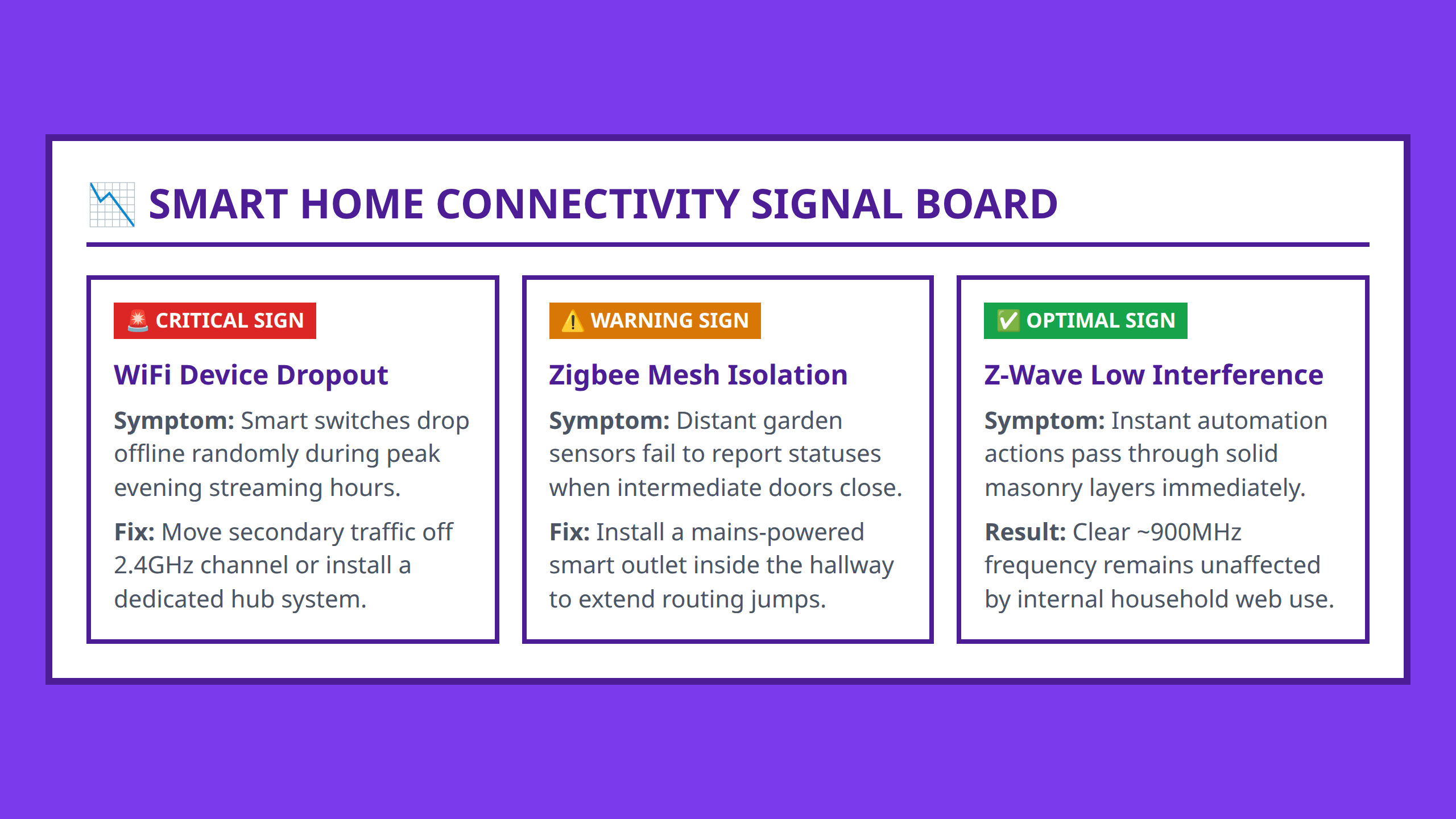
However, the same structure that makes WiFi simple also creates limitations. When too many devices connect at once, they compete for bandwidth on the same network. Many smart devices also operate on the 2.4GHz frequency band, which is already crowded with household WiFi traffic. This congestion can lead to delays, missed commands, or temporary disconnections.
For example, imagine a home with 25 smart devices including lights, cameras, and sensors. When multiple devices try to send signals at the same time, the router becomes overloaded. A simple command like “turn off the living room lights” may take longer than expected or fail entirely during peak usage.
WiFi is still useful, especially for devices that need high bandwidth or direct internet access. But relying on WiFi alone for a full smart home system can create stability issues as the system grows.
Zigbee and Z-Wave Mesh Networks Explained
Unlike WiFi, Zigbee and Z-Wave are designed specifically for low-power smart devices. These protocols are not just about sending data—they are about creating efficient communication networks that scale well in large smart homes.
Zigbee Mesh Networking
Zigbee uses a mesh network, meaning devices communicate not only with a central hub but also with each other. Each device can relay signals to extend the network further. This makes Zigbee highly scalable, especially in larger homes or buildings.
For example, a smart light in the living room can pass a signal to another device in the hallway, which then passes it to a sensor in the bedroom. As more Zigbee devices are added, the network becomes stronger because there are more pathways for communication.
However, Zigbee also operates on the 2.4GHz frequency band, which means it can still face interference from WiFi networks. In a home with heavy WiFi usage, Zigbee devices may occasionally experience reduced performance or signal overlap.
Z-Wave Reliability and Range
Z-Wave takes a different approach by operating at a lower frequency, around the 900MHz range. This helps reduce interference from WiFi and other household wireless devices. It also improves signal penetration through walls and floors.
Another advantage is range. Z-Wave signals can reach up to approximately 300 feet in open conditions, making it suitable for larger homes or properties with multiple floors or separate buildings.
Unlike Zigbee, Z-Wave supports fewer hops between devices, but it compensates with stability and lower interference. This makes it especially strong in environments where WiFi congestion is a problem.
For instance, a smart lock installed on a detached garage door may respond more reliably with Z-Wave than WiFi or Zigbee due to its ability to maintain a stable long-distance connection.
Choosing the Right Protocol for Your Home
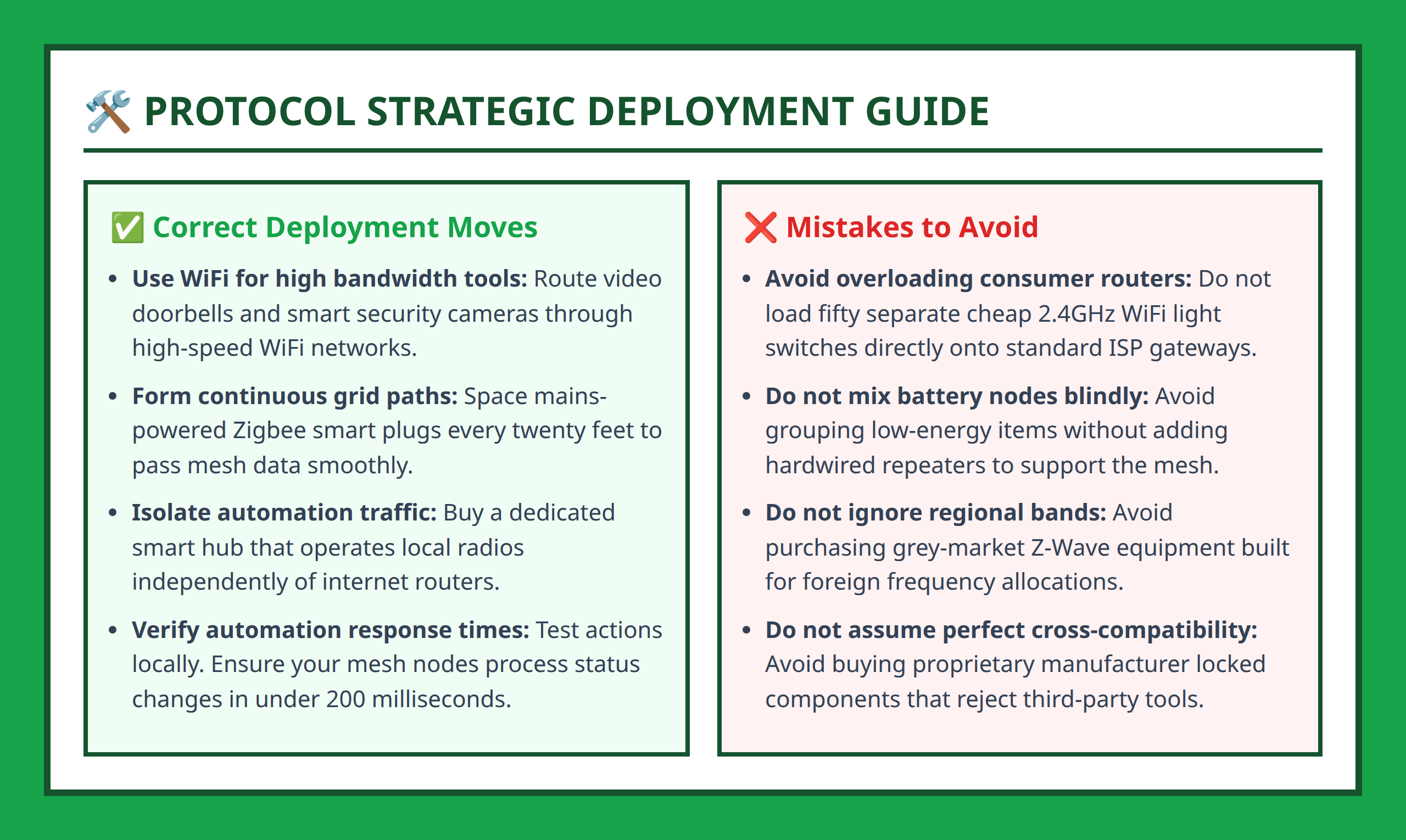
There is no single “best” smart home protocol. The right choice depends on your home size, number of devices, and what you want to automate. Most advanced smart homes actually combine multiple protocols instead of relying on just one.
WiFi works best for simple setups where only a few devices are connected, such as smart speakers or cameras that require high bandwidth. It is easy to use and does not require extra hardware.
Zigbee works best for scalable ecosystems, especially lighting systems and sensor networks. Because devices form a mesh, the system becomes more reliable as more devices are added. This makes it a strong choice for whole-home lighting automation.
Z-Wave is ideal for stability and range. It is often used for security systems, smart locks, and devices located far from the router or hub. Its lower frequency reduces interference and improves reliability in complex environments.
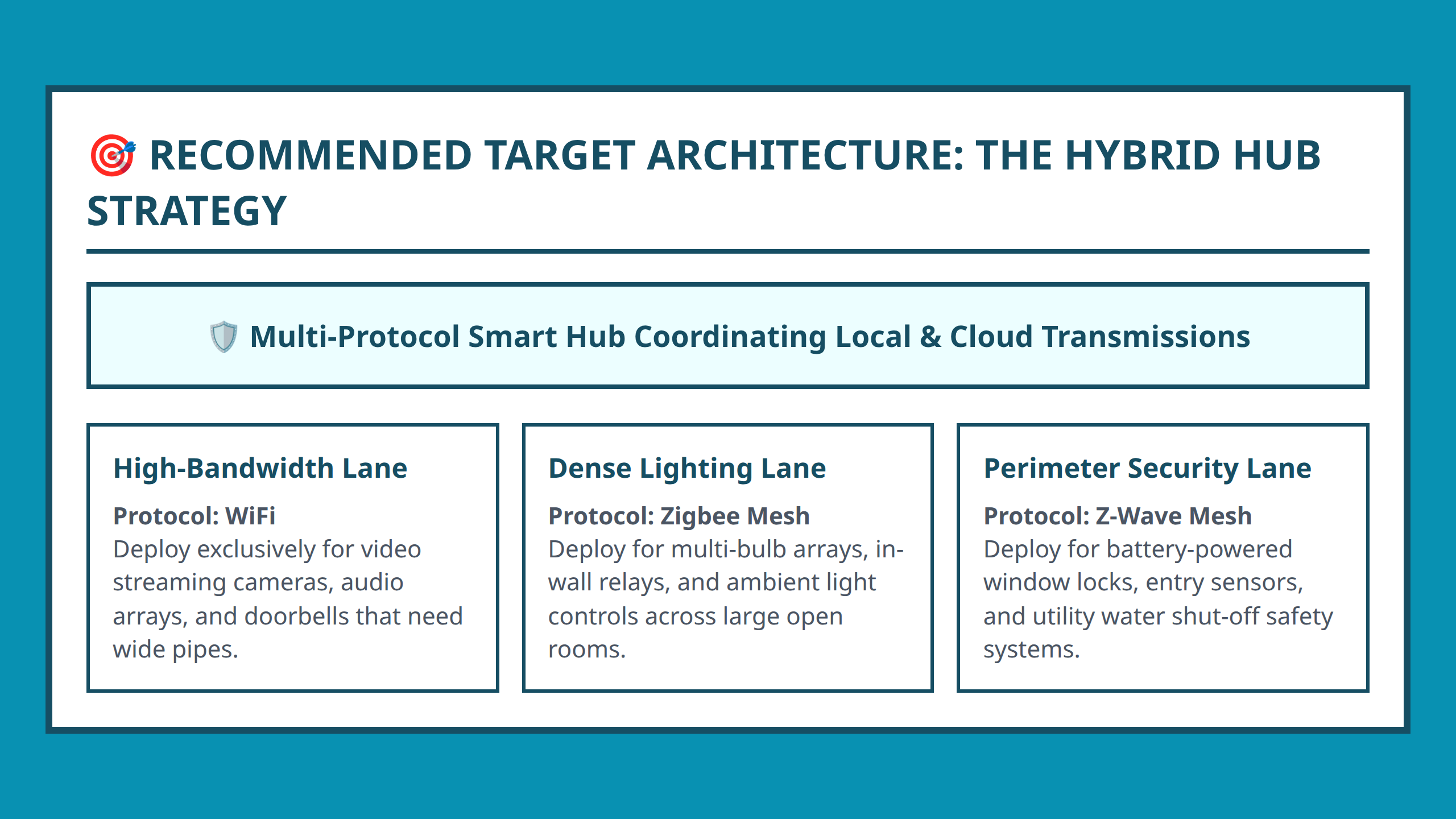
In most modern setups, a smart hub plays an important role by supporting multiple protocols. Instead of forcing every device onto WiFi, a hub can coordinate Zigbee, Z-Wave, and WiFi devices together in one system. This hybrid approach reduces congestion and improves long-term scalability.
For example, a homeowner might use WiFi for security cameras, Zigbee for lighting, and Z-Wave for door locks—all connected through a single hub. This structure avoids overloading one network and distributes communication more efficiently.
FAQ
- Star topology: A network structure where all devices connect to a single central access point such as a WiFi router.
- Mesh network: A system where devices connect to each other and relay signals, improving coverage and reliability.
- 2.4GHz band: A common wireless frequency used by WiFi and Zigbee that can become crowded in busy environments.
- Z-Wave: A smart home protocol operating at a lower frequency designed for stable, long-range communication.
- Smart hub: A central controller that connects and manages multiple smart home protocols and devices.
References:
- https://datawiresolutions.com/blog/zigbee-vs-zwave-vs-wifi-vs-thread
- https://www.reddit.com/r/homeassistant/comments/11o2s4m/best_protocols_for_certain_device_types_wifi/
- https://www.reddit.com/r/homeautomation/comments/1eamwov/new_smart_home_what_protocol_should_i_use_zigbee/
- https://www.reddit.com/r/homeassistant/comments/1m6luxg/most_reliable_stable_and_secure_protocol/
- https://www.youtube.com/watch?v=x9erKDKQMpE
- https://www.youtube.com/watch?v=v8-VNIQQiQE
- https://www.youtube.com/watch?v=qCsU9xMFI9M
- https://aziot.com.ua/en/blog/zigbee-vs-z-wave-vs-wi-fi-choosing-the-right-iot-protocol/
- https://kamonk.in/blogs/z-wave-vs-zigbee-vs-wi-fi/1
- https://community.home-assistant.io/t/zigbee-vs-z-wave-vs-wifi/362482
- https://www.dfrobot.com/blog-13453.html
- https://www.silabs.com/blog/smart-home-technology-comparison
- https://zigbeehubs.com/zwave-vs-zigbee/
